Multi-store linking
Group listings from different platforms into one product connection, so a stock change on any of them propagates to the rest.
A product by Kubera Software

A multi-platform inventory management system. Link a product across your stores once, and eCom Pal keeps the stock levels in agreement — so selling the last one on eBay does not leave it listed as available on Amazon.
If you sell the same stock through more than one channel, your inventory numbers drift apart the moment an order comes in. A seller with one item left and three active listings either oversells and takes the cancellation hit, or holds back stock as a safety buffer and loses sales that were available to make.
The usual answer is to reconcile by hand, several times a day, across every dashboard. eCom Pal replaces that with a single record of what you actually hold. You tell it, once, that a listing on eBay and a listing on Amazon are the same physical product. From then on, when the quantity changes on one, eCom Pal updates the others to match.
It was built by an online seller managing their own multi-channel listings, which is why it starts from the seller’s side of the problem rather than from an integrations catalogue.
Group listings from different platforms into one product connection, so a stock change on any of them propagates to the rest.
Works across eBay, Amazon and WooCommerce stores, letting one seller run several storefronts from a single inventory record.
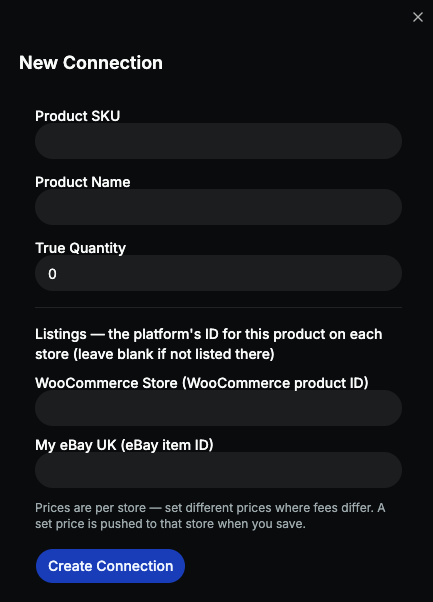
Pull your existing listings in from a connected store instead of retyping them, then link them up from the dashboard.
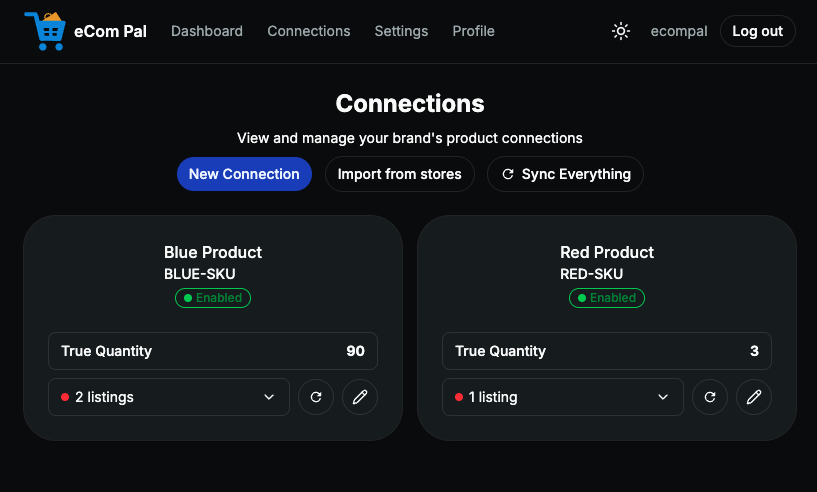
One screen showing every linked product, which stores it spans, and its current tracked quantity.
Add colleagues to the account on paid plans, so a team can manage stock without sharing one login.
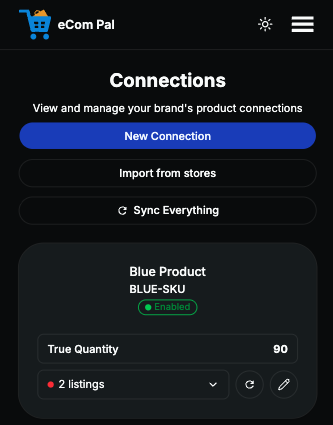
The app is fully responsive. Check and adjust connections from a phone or tablet, not only a desktop.
The app itself
Every screen below is the live app, not a mock-up.
Setup
Three steps, in order.
Get your items live on the sales platforms you use, if they are not already. eCom Pal works with listings that exist rather than creating them for you.
Connect each store to your eCom Pal account, then add a product connection joining the listings that represent the same physical item.
Your dashboard tracks inventory across the linked platforms and pushes updates when quantities change, so the numbers stay in agreement without manual reconciliation.
Pricing
Every plan is a rolling monthly subscription that you can change or cancel from your settings page. There is no minimum term and no contract. Prices are in pounds sterling and shown per month.
| Plan | Price / month | Product connections | Stores | Users | |
|---|---|---|---|---|---|
| Free | £0 | 5 | 2 | 1 | Sign up |
| Starter | £19 | 50 | 2 | 2 | Sign up |
| Growth | £39 | 200 | 4 | 5 | Sign up |
| Pro | £79 | 500 | 8 | 10 | Sign up |
| Enterprise | Custom quoted |
500+ | Custom | Custom | Get a quote |
If you need more capacity but not a bigger plan, you can buy add-on packs for extra product connections, extra stores, or extra users. Add-ons that are charged as a one-off stay with your account when you change tier, so upgrading later does not waste what you have already paid for. Add-on prices are listed alongside the plans on the eCom Pal site.
Above 500 connections we price per account, because the cost depends on connection volume, store count and user seats. Tell us your numbers and we will send a written quote — there is no obligation and no automated sales sequence.
eCom Pal only works if it can read and update listing information on the platforms you connect, so it is worth being plain about what that involves.
When you connect a store, you authorise eCom Pal through that platform’s own approval screen. You can withdraw that authorisation at any time from the platform or from your eCom Pal settings, and the sync stops. We request the narrowest permissions that the sync feature needs.
The full detail — what is collected, how long it is kept, who processes it, and how to request deletion — is in the eCom Pal privacy policy and in the Kubera Software privacy policy.
Independence. eCom Pal is developed and operated solely by Kubera Software. It is not affiliated with, endorsed by, or sponsored by Amazon, eBay or Automattic, and it is not distributed as part of any other company’s app store. Platform names appear here only to describe which marketplaces the software connects to.
Product support runs through the eCom Pal contact form, which reaches the people who maintain the app. For anything about Kubera Software as a company — billing, data requests, partnerships — email [email protected]. We aim to reply within two working days.
The eCom Pal terms of use, privacy policy and cookie policy are published in full and readable without an account.